
A PrestaShop sitemap is an XML file listing the URLs you want Google to crawl. It does not rank on its own. It stops new product pages or secondary languages from staying orphaned when internal links do not reach everything.
On PrestaShop 8 and 9 the usual path is the official Google sitemap module (gsitemap). Large or multilingual catalogues often need a module that splits the XML by page type. Then you submit it to Search Console and regenerate it with a cron job. If PrestaShop SEO is already broken by filters, duplicates or noindex, the sitemap only spreads the problem.

What the sitemap should include
Only canonical, indexable URLs: active products, categories you want to rank, CMS pages and, if they have a real customer-facing sheet, brands. Leave out cart, checkout, login, internal search, disabled products and facet URLs (?q= / filters) that are not real landings.
Google allows up to 50,000 URLs or 50 MB per file. A catalogue of 8,000 SKUs with badly published combinations can inflate the XML with addresses that should not exist. The native module writes an index (sitemap.xml) plus child files; Search Console should get the index, not each child by hand.
A stale sitemap is worse than none. If you publish 40 products a week and regenerate the XML by hand every three months, Googlebot keeps requesting URLs that no longer exist and is slow to learn about new ones.
Google sitemap module (gsitemap)
This is PrestaShop’s free module. On 8.2+ the current package is 5.x. On old 1.7 shops you sometimes have to install the zip from Addons or from the repository.
Typical steps:
Enable Google sitemap under Modules.
Tick which entities to include (products, categories, CMS). Untick suppliers if they have no useful customer page.
Generate the XML. The URL is usually https://yourdomain.com/sitemap.xml.
Copy the cron URL the module shows and schedule a daily job on the server (or in the hosting panel). Without cron, the file stays frozen at the last click.
Limits: little granularity, coarse exclusion, and less control than a third-party module on large multilingual shops. Fine for a small or mid-size catalogue. Short if an SEO needs product coverage split from categories in Search Console.

LGSitemap and DevBlinders Sitemap
LGSitemap (Línea Gráfica) splits products, categories and images, lets you set priority and frequency, and can exclude hidden products. We use it when Search Console mixes every URL type in one bucket and you cannot isolate a coverage issue.

Sitemap by DevBlinders is free and works well on multilingual stores: one XML per language. You choose which page types go in. In practice it is still the most complete open-source alternative to the native module.
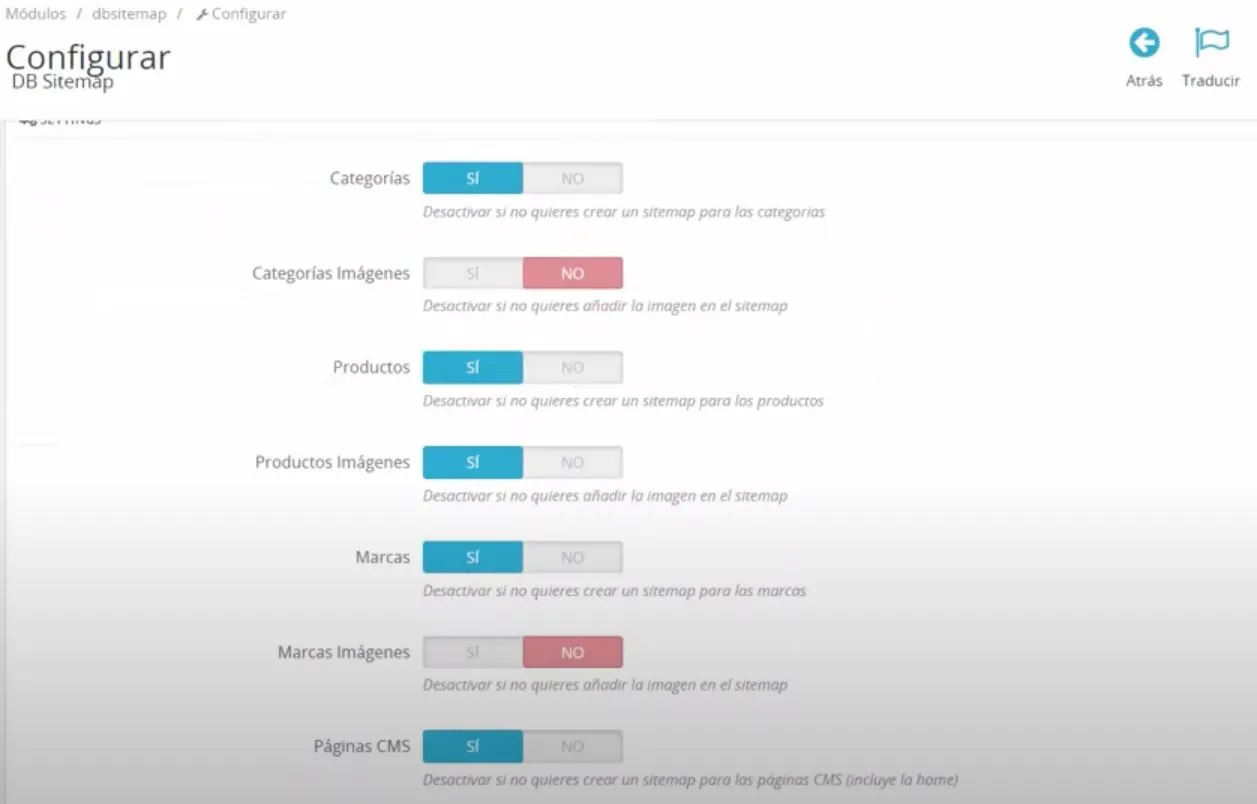
There are more SEO modules for PrestaShop. A sitemap does not replace canonicals, hreflang or a coherent robots.txt. If the search module creates thousands of indexable URLs, close those doors first.
Screaming Frog and hand-built sitemaps
On a tiny site (Frog’s free cap, 500 URLs) you can export an XML and drop it in the root. Fine for a landing page or a minimal catalogue. It does not scale: every new product means another crawl. In production the XML should come from the CMS, not a weekly export.
How to submit it to Google
Verify the property in Search Console.
Indexing → Sitemaps → paste https://yourdomain.com/sitemap.xml.
Wait for status “Success”. “Couldn’t fetch” is usually maintenance mode, HTTP auth or a 404.
The old Google ping (/ping?sitemap=) is gone. The module cron regenerates the XML; Googlebot refetches on its own schedule. If a new URL never appears, the bottleneck is rarely the sitemap. It is indexing time or a noindex inherited from the template.
Add Sitemap: https://yourdomain.com/sitemap.xml to robots.txt for Bing and other crawlers. Do not block /sitemap.xml or the child files.
Common mistakes
Including disabled products or combinations with no canonical sheet.
A single 80,000-URL XML with 60,000 filters.
Generating by hand and forgetting cron after a deploy.
Submitting the www sitemap when the canonical is apex (or the other way around).
Multilingual URLs without hreflang: the XML lists /es/ and /fr/ as separate pages and Google treats them as duplicates.
A sitemap is a list of suggestions. If architecture and canonicals are sound, Googlebot uses it. If not, it only speeds up crawling junk.


