
In this article, we explain how to modify metadata in PrestaShop. If you own an online store built with PrestaShop, you should know how to use metadata to improve your page’s SEO positioning. Metadata is information included in a page’s HTML code that helps search engines understand the page content and display it in search results.
Before we begin, keep in mind that PrestaShop allows you to modify metadata at page level and category level. Page-level metadata applies to a specific page, while category-level metadata applies to all pages that belong to that category.

Elements that make up metadata in PrestaShop
Before going into how metadata can be modified in each of the different pages that make up a PrestaShop site, we need to know which elements make up this metadata.
Metadata on a PrestaShop website refers to the information used to describe and label page content, helping search engines and users understand what each page is about and improving the site’s SEO.
The elements that make up metadata in PrestaShop include:
- Page title (title): Also known as the SEO title or meta title. It is the name that appears in the browser tab and in search results. It should be brief and descriptive, and include keywords relevant to the page content.
- Description (meta description): A short description of the page content that appears below the title in search results. It should be concise and appealing to encourage users to click the link.
- Keywords (keywords): Keywords relevant to the page content. These words are used to index the page content in search engines.
- Friendly URL (friendly URL): In SEO, this is known as the “slug”. It is a URL that contains keywords and is easy for users to understand. This can help improve the site’s usability and SEO.
These are the main elements, although the following elements are also considered metadata. In this case, they are not as important:
- Tags (tags): Additional keywords used to categorize and classify the page content.
- Images (images): Images can also have metadata, such as titles, descriptions, and alt tags. This metadata can help improve image accessibility and SEO on the site.
Metadata should be relevant and accurate for the page content, as this helps improve the site’s visibility and ranking in search engines.
How to modify homepage metadata in PrestaShop
Modifying homepage metadata in PrestaShop is an important task for improving the page’s search engine ranking and increasing website visibility. The homepage is one of the most important pages on a website, so its metadata needs to be accurate and relevant.
To modify homepage metadata in PrestaShop, follow these steps:
- Access the PrestaShop admin panel.
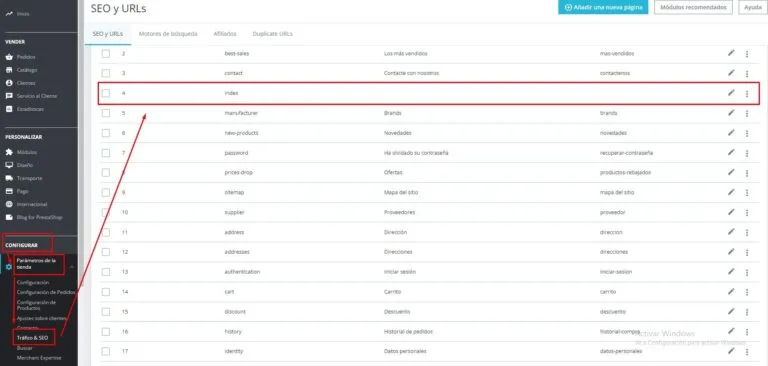
- In the left-hand menu, within the “Configuration” section, select “Shop Parameters”.
- Next, select “SEO and URLs”.
- When the tab opens, several pages will appear. For the homepage, it is usually the page called “index”.
- Select the page whose metadata you want to modify.
- Once inside the page, you will see several options for modifying metadata, such as the title, description, or keywords.
Modify metadata at page level
Modifying page-level metadata on a PrestaShop website is an important task for improving the visibility and ranking of pages in search engines. Metadata, such as the title, description, and keywords, helps search engines understand the content of a page and index it correctly.
To modify page-level metadata in PrestaShop, you must first access the page you want to modify in the PrestaShop back office. Once there, you can find the fields for modifying metadata in the “SEO” tab within the “Page information” section.
To modify metadata at page level, follow these steps:
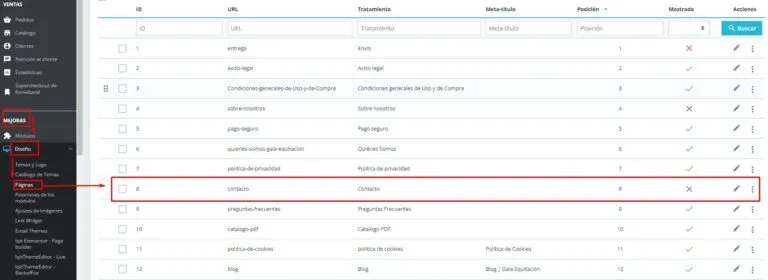
- From the home position of our PrestaShop, go to the “Improve” section.
- Once there, select Design > Pages. This opens a table with all the pages you have (categories and products are not included in this section).
- From here, you can choose the page whose metadata you want to change.
- On the far right, either using the pencil icon or by opening the three-dot menu, select the modify option.
- A tab will then open with all the information associated with that page, from its title to its slug.
Steps to change category metadata in PrestaShop
Changing a category’s metadata is only one part of a website SEO strategy. You also need to optimize the website’s content and structure to achieve better results in search engines.
Fortunately, changing a category’s metadata in PrestaShop is a simple process that can be completed in a few steps.
To change category metadata in PrestaShop, follow these steps:
First, log in to your PrestaShop admin panel and go to the “Catalog” section in the main menu. Then select “Categories” to view a list of all product categories in your online store.
Once you have selected the category you want to modify, click on it to access its configuration page. In the “Information” tab, you will find metadata fields such as “Meta Title” and “Meta Description”. These fields allow you to add text that describes the category in question and will be shown in Google search results.
To change the category metadata, simply enter the new values in the corresponding fields and click “Save”. Make sure your meta title and description are accurate, descriptive, and relevant to the category in question. Also, try to include relevant keywords that help search engines index your website correctly.
After saving the changes, it is good practice to check that the new metadata has been saved correctly. To do this, simply return to the category page and verify that the values in the metadata fields match the ones you just entered.


